

HW Key Tool v2.3.3 Download, Features, Supported Models and Buy Credits
In the mobile repairing industry, software tools play a very important role. Every day, mobile technicians deal with many Android problems such as FRP lock, forgotten screen lock, flashing errors, dead boot issues, and software corruption. To solve these problems quickly and professionally, technicians need a reliable and easy-to-use tool. One such useful tool is HW Key Tool v2.3.3.
- What is HW Key Tool?
- Why HW Key Tool v2.3.3 is Special
- Supported Devices in HW Key Tool v2.3.3
- Main Features of HW Key Tool v2.3.3
- Simple Interface But Powerful Tool
- HW Key Tool Support Model – Why It Matters
- Who Should Use HW Key Tool v2.3.3?
- Benefits of HW Key Tool v2.3.3
- Things to Know Before Using the Tool
- HW Key Tool v2.3.3 Download Link
- Buy HW Key Tool Credits
- Why HW Key Tool v2.3.3 is Useful in the Indian Mobile Repair Market
- Final Words
- FAQ Questions and Answers
If you are searching for a practical Android repair software for Windows PC, then HW Key Tool may be a good option for you. It is designed to help technicians and software users perform important mobile servicing functions on supported Android devices. From FRP bypass to pattern reset, and from flashing operations to Qualcomm and MTK functions, this tool offers many features in one place.
In this article, we will explain everything about HW Key Tool v2.3.3, including its features, supported models, benefits, and where you can download the latest version and buy credits.
What is HW Key Tool?
HW Key Tool is a software program that can be installed on Windows computers. It is mainly used to repair software-related problems in Android smartphones. This tool is popular among mobile technicians because it can handle many common Android issues in a simple and fast way.
In mobile repairing shops, two of the most common problems are FRP lock and pattern or password lock. Many customers forget their screen lock, while others face Google account lock after resetting their phone. In such cases, a tool like HW Key Tool v2.3.3 becomes very useful.
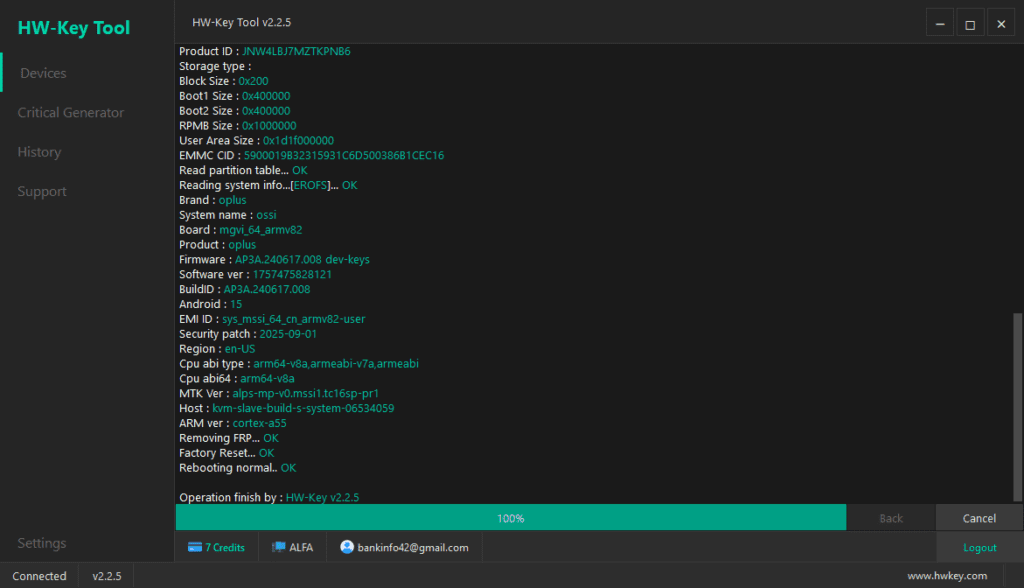
The software is made with a user-friendly interface, which means even a beginner can understand the basic options. At the same time, it offers powerful functions that are suitable for professional technicians as well. That is why many users consider it a practical Android repair solution.
Why HW Key Tool v2.3.3 is Special
There are many mobile software tools available online, but not every tool gives the right balance of features, simplicity, and multi-brand support. HW Key Tool v2.3.3 stands out because it offers useful functions in a clean and easy layout.
One reason why it is special is its simple interface. Many tools are too complex for new users. They include too many menus and confusing options. But HW Key Tool keeps things easier, so users can quickly access the functions they need.
Another reason is its broad device support. A mobile technician does not work with only one brand. In a normal repair shop, phones from Samsung, Xiaomi, Vivo, Oppo, Realme, Infinix, Tecno, and many other brands come every day. Instead of using different software for different jobs, a technician can use one tool for multiple operations on different supported models.
The latest version, HW Key Tool v2.3.3, is also considered useful because it combines daily repair functions in one place. This makes it practical for workshops and technicians who want to save time.
Supported Devices in HW Key Tool v2.3.3
One of the biggest advantages of this software is its support for different chipsets and Android brands.
Chipset Support
HW Key Tool supports:
- Qualcomm-based devices
- MediaTek (MTK) devices
These two chipsets are widely used in Android smartphones, especially in the Indian mobile market. Because of this, the tool becomes useful for a large number of devices.
Brand Support
The HW Key Tool support model list includes selected devices from:
- Samsung
- Xiaomi
- Redmi
- Mi
- Poco
- Oppo
- Vivo
- Realme
- Huawei selected old models
- Honor selected models
- Motorola limited models
- Nokia selected Android models
- Lenovo limited support
- Infinix
- Tecno
- Lava selected MTK models
- Micromax selected models
This support range makes the tool suitable for technicians who handle different Android phones in one shop.
Main Features of HW Key Tool v2.3.3
Now let us understand the most important features of this tool in detail.
1. FRP Bypass
FRP stands for Factory Reset Protection. This security feature is found in most Android devices. When a phone is reset without removing the previous Google account, it may ask for the old account details. This becomes a common issue for many users.
HW Key Tool v2.3.3 offers FRP bypass functions for supported models. This helps technicians solve Google lock problems faster and more easily.
2. Pattern and Password Reset
Many phone users forget their pattern, PIN, or password. In such cases, the phone becomes locked, and the user cannot access it.
This tool includes pattern/password reset features that help remove screen lock problems on supported devices. This is one of the most demanded software services in local repair shops.
3. Flashing and Firmware Operations
Flashing is a very important process in mobile software repair. When a phone is stuck on logo, boot loop, or showing software-related issues, technicians may need to reinstall or update the firmware.
HW Key Tool supports flashing and firmware operations, making it useful for software troubleshooting and maintenance.
4. Qualcomm EDL Mode Support
EDL mode is an advanced recovery or service mode used in Qualcomm devices. It helps technicians perform deeper software operations in some special cases.
includes Qualcomm EDL support, which adds extra flexibility for advanced repair jobs on supported devices.
5. MTK Functions
MediaTek devices are very common in budget and mid-range smartphones. In India, many brands use MTK chipsets in their devices.
This tool offers useful MTK-based functions, which means technicians can service many MediaTek phones using the same software.
Simple Interface But Powerful Tool
A good software tool should not only be powerful, but also easy to use. This is whereHW Key Tool v2.3.3 performs well. Its layout is simple, and the main functions are easy to understand. This saves time for technicians, especially in busy workshops.
For beginners, the simple interface reduces confusion. For professionals, it improves speed and efficiency. That is why this tool is suitable for both new users and experienced technicians.
HW Key Tool Support Model – Why It Matters
When users search for support model, they want to know whether the software supports the phone brands they work on daily. This is very important because a tool is only useful if it supports real devices that come into the shop.
For example:
- Samsung support is helpful for FRP and software servicing jobs
- Xiaomi and Poco support is useful because these phones are very common
- Oppo, Vivo, and Realme support matters because these brands are popular in offline markets
- Infinix, Tecno, Lava, and Micromax support is valuable for budget phone servicing
Because of this, the support list is one of the strongest parts of the tool.
Who Should Use HW Key Tool v2.3.3?
This tool is useful for many types of users.
Mobile Technicians
If you run a repair shop or work as a technician, this tool can help with common Android software jobs.
GSM Software Users
Users who regularly work with Android tools may find this software practical and time-saving.
Beginners
Its simple interface makes it beginner-friendly for users who are learning mobile software repair.
Multi-Brand Service Centers
If your shop handles different phone brands every day, then a multi-brand tool like HW Key Tool can be useful.
Benefits of HW Key Tool v2.3.3
There are several reasons why technicians may prefer this tool.
It helps save time during daily repair work.
It offers a clean and easy interface.
It supports many common Android brands.
It includes useful features like FRP bypass, password reset, and flashing.
It supports both Qualcomm and MTK devices.
It is suitable for both basic and advanced repair jobs.
These benefits make HW Key Tool v2.3.3 a good choice for Android software repair work.
Things to Know Before Using the Tool
Before using any mobile repair software, users should keep a few important points in mind.
First, install the tool on a compatible Windows PC.
Second, make sure the required drivers are properly installed.
Third, always check whether the target model is supported.
Fourth, understand that some operations may erase user data.
Finally, use the tool carefully and responsibly during software servicing.
These points are important for safe and professional usage.
HW Key Tool v2.3.3 Download Link
If you want to download HW Key Tool v2.3.3, you can use the setup link below.
Latest Version
Download HW Key Tool v2.3.3
Download the latest HW Key Tool v2.3.3 setup for Windows PC using the official link below. This section is designed only for the download area and will not affect other parts of your website.
Always download software from a trusted source to avoid installation issues or damaged files.
Buy HW Key Tool Credits
To use professional functions properly, users may need valid access or credits. If you want to buy HW Key Tool credits, you can use the link below.
Official Credits
Buy HW Key Tool Credits
Buy HW Key Tool credits from GsmBazaar using the secure link below.
Latest Version
Download HW Key Tool v2.3.3
Download the latest HW Key Tool v2.3.3 setup for Windows PC using the official link below.
https://www.hwkey.com/setup/HWKey_Setup_v2.3.3.exe
Official Credits
Buy HW Key Tool Credits
Buy HW Key Tool credits from GsmBazaar using the secure product link below.
https://www.gsmbazaar.in/products/hw-key-tool-credits
This section is made only for the buy area and will not affect other sections of your website.
Buying from a trusted seller is always a better option for professional mobile technicians.
Why HW Key Tool v2.3.3 is Useful in the Indian Mobile Repair Market
The Indian mobile repair market is very active. Every day, technicians receive many phones with lock problems, software bugs, and flashing needs. Because many local shops handle mixed brands, a tool with broad support is more practical.
HW Key Tool v2.3.3 is useful in this market because it offers common functions for popular Android brands. It helps technicians work faster and manage more software jobs from one platform.
Final Words
To sum up, HW Key Tool v2.3.3 is a useful Android repair software for technicians and GSM users who want a simple but powerful tool. It supports important functions like FRP bypass, pattern/password reset, flashing, Qualcomm EDL mode, and MTK functions. It also supports selected models from popular brands such as Samsung, Xiaomi, Oppo, Vivo, Realme, Infinix, Tecno, and more.
Its easy interface, practical features, and multi-brand support make it a valuable choice for daily repair work. If you are looking for a tool that can help with Android software servicing, HW Key Tool v2.3.3 is worth checking.
You can download the latest version using the official setup link and buy credits from GsmBazaar for professional use.
FAQ Questions and Answers
What is HW Key Tool v2.3.3?
HW Key Tool v2.3.3 is a Windows-based Android repair software used to solve software-related issues on smartphones. It is commonly used for FRP bypass, pattern or password reset, flashing, and device servicing on supported Android models.
Which devices are supported by HW Key Tool?
HW Key Tool supports selected models from Samsung, Xiaomi, Redmi, Mi, Poco, Oppo, Vivo, Realme, Huawei, Honor, Motorola, Nokia, Lenovo, Infinix, Tecno, Lava, and Micromax. It also supports Qualcomm and MediaTek based devices.
Where can I buy HW Key Tool credits?
You can buy HW Key Tool credits from GsmBazaar using this link:
https://www.gsmbazaar.in/products/hw-key-tool-credits
https://www.gsmbazaar.in/products/hw-key-tool-credits
About Me

Sanjeev Saini
Sanjeev Kumar – A passionate B.Com graduate, blogger, and creative designer. I have a deep passion for Blogging, SEO, Digital Marketing, Graphics Design, and Website Development. Now, I’m helping beginners build stunning WordPress websites and eye-catching graphics to grow their online presence. 🚀

Latest Posts


Related Articles
Unlock Tool 2026.08.02.0 Released – Apple A12/A13 Ramdisk Support | Unlock Tool Download Latest Update
Download Unlock Tool 2026.08.02.0 latest update with Apple A12/A13 Boot Ramdisk support, Samsung Qualcomm Loader update,...
UnlockTool 2026.07.30.0 Released – Apple A12/A13 Boot Ramdisk & Samsung Qualcomm Loader Update (Complete Guide)
UnlockTool 2026.07.30.0 is now available with one of the biggest updates of 2026. This release introduces...
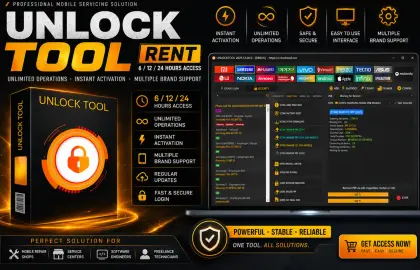
Unlock Tool Rent – Get Unlock Tool 6/12/24 Hours Access License at Lowest Price (Instant Activation)
Need Unlock Tool Rent? Get 6, 12 & 24 Hours Unlock Tool Access with instant activation,...